
Ten new free tools for Azure, Entra and Intune admins, and Admin Lens 2.1
Test NSG rules, Azure Policy definitions and dynamic group rules before you save them, see Conditional Access gaps in one grid, spot drift and Intune conflicts, and check Autopilot CSVs. Plus Admin Lens 2.1, which now explains RBAC actions, IP addresses, Windows builds, certificates and sign-in logs, and lets you add your own dictionary.
On this page
Some of the most stressful moments in admin work are the seconds before you press Save. Will this NSG rule block the traffic? Will this policy deny the deployment? Who ends up in this dynamic group? Usually the only way to find out is to try it in production and watch.
So this release is mostly about finding out first. There are ten new tools on the site, all free and all running in your browser, and a new version of the Admin Lens browser extension.
Test before you save
NSG rule tester
Paste the JSON for a network security group, from az network nsg show or the portal's JSON view, then describe the traffic: source, destination, port and protocol. The tester walks the rules in priority order, including the default rules, and tells you which rule decides and whether the traffic is allowed. If you add the subnet and NIC groups, it follows the order Azure uses: subnet then NIC for inbound, NIC then subnet for outbound.
It also flags rules that can never take effect because a higher-priority rule already covers them, and management ports such as RDP and SSH open to the internet.
Azure Policy tester
Paste a policy definition and a resource's JSON and see whether the policy would deny, audit, modify or ignore it, with the rule written out in plain English. It handles allOf, anyOf, not, aliases with [*], count and the common template functions, so you can try a definition before you assign it.
Dynamic group rule tester
Check a membership rule's syntax and see which of your sample users or devices would match before you save the group. It catches the mistakes the portal doesn't explain well, such as curly quotes pasted from a document, unknown properties and rules over the length limit, and it suggests faster operators where Microsoft recommends them.
See the whole picture
Conditional Access coverage matrix
Load your Conditional Access policies as JSON and get one grid: who you've included down the side, which apps across the top, and in each cell the strongest control that applies. Gaps where nobody requires MFA or blocks access stand out straight away, and you can click any cell to see which policies apply and what conditions they have.
Tenant drift checker
Compare two configuration exports, such as last month's Conditional Access policies and today's, and see every policy that was added, removed or changed, field by field. Timestamps and other noise are ignored, and you can copy the result as Markdown for a change record.
Intune policy conflict finder
Export your Settings Catalog policies and find settings configured differently in two policies, before devices start reporting conflicts. It also lists settings duplicated with the same value and policies assigned to the same groups.
Activity log storyteller
Turn an Azure Activity log export, JSON or CSV, into a readable story of who changed what, with related events grouped together and deletions, role assignments and other risky changes flagged.
Small jobs, done properly
Autopilot CSV checker
Check a hardware hash file against Microsoft's import rules before Intune rejects it: the exact headers, no quotes, ANSI encoding, no duplicate serial numbers and no more than 500 rows per file. It downloads a fixed file, split into batches of 500 if needed.
KQL explainer
Paste any KQL query and get each step in plain English, with tips from Microsoft's query best practices, such as using has instead of contains and filtering on time first.
Azure cost what-if
List your VMs, or paste the output of az vm list, and see the monthly pay-as-you-go cost from Microsoft's public retail prices, next to what one-year and three-year reservations would cost. It's an estimate for planning, not a quote. Your agreement prices, discounts and taxes aren't included.
Admin Lens 2.1
Admin Lens is the free browser extension that explains codes and IDs right where they appear in the Azure, Entra and Intune portals. Version 2.1 is the biggest update yet.
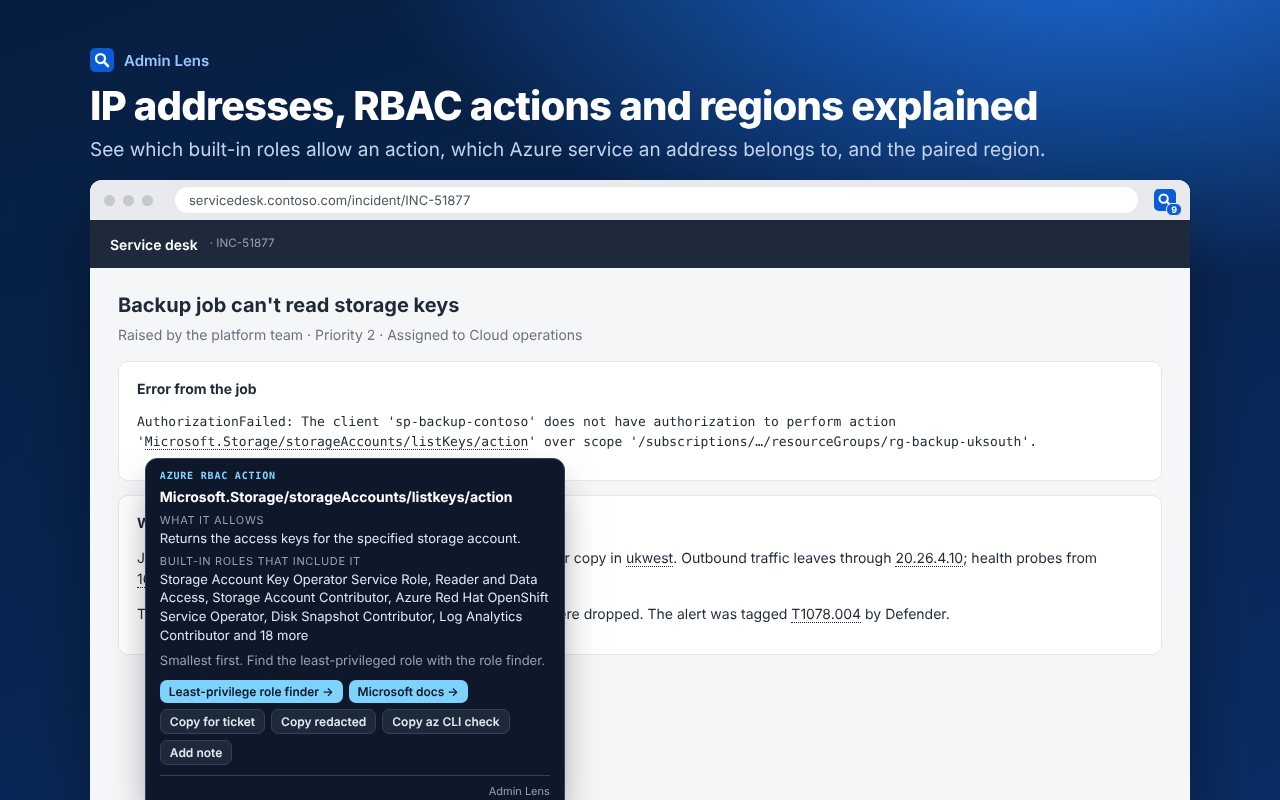
More things explained
- Azure RBAC actions. Hover
Microsoft.Storage/storageAccounts/listKeys/actionin an AuthorizationFailed error for what it allows and the built-in roles that include it, smallest first. - IP addresses. Private ranges, Azure's platform address
168.63.129.16, and public Azure addresses matched to their service tag and region from Microsoft's published ranges. - Windows builds.
10.0.26100shows the release and when updates end. - Certificates and SAML. Subject, expiry, thumbprint and claims, decoded on your device.
- Sign-in logs. Paste a sign-in log entry into the popup for the error, the Conditional Access policy that applied, the device and what to do next.
- And more. Intune OMA-URI paths, Azure regions with their pairs, Microsoft Graph HTTP status codes and MITRE ATT&CK technique IDs.
Make it yours
Add your own server names, subscription IDs and internal error codes to the dictionary, and Admin Lens explains them everywhere. Add a private note to any card, such as who owns a server or what fixed an error last time, and it shows every time you meet the same thing again. Choose up to three team time zones and every UTC time shows them too.
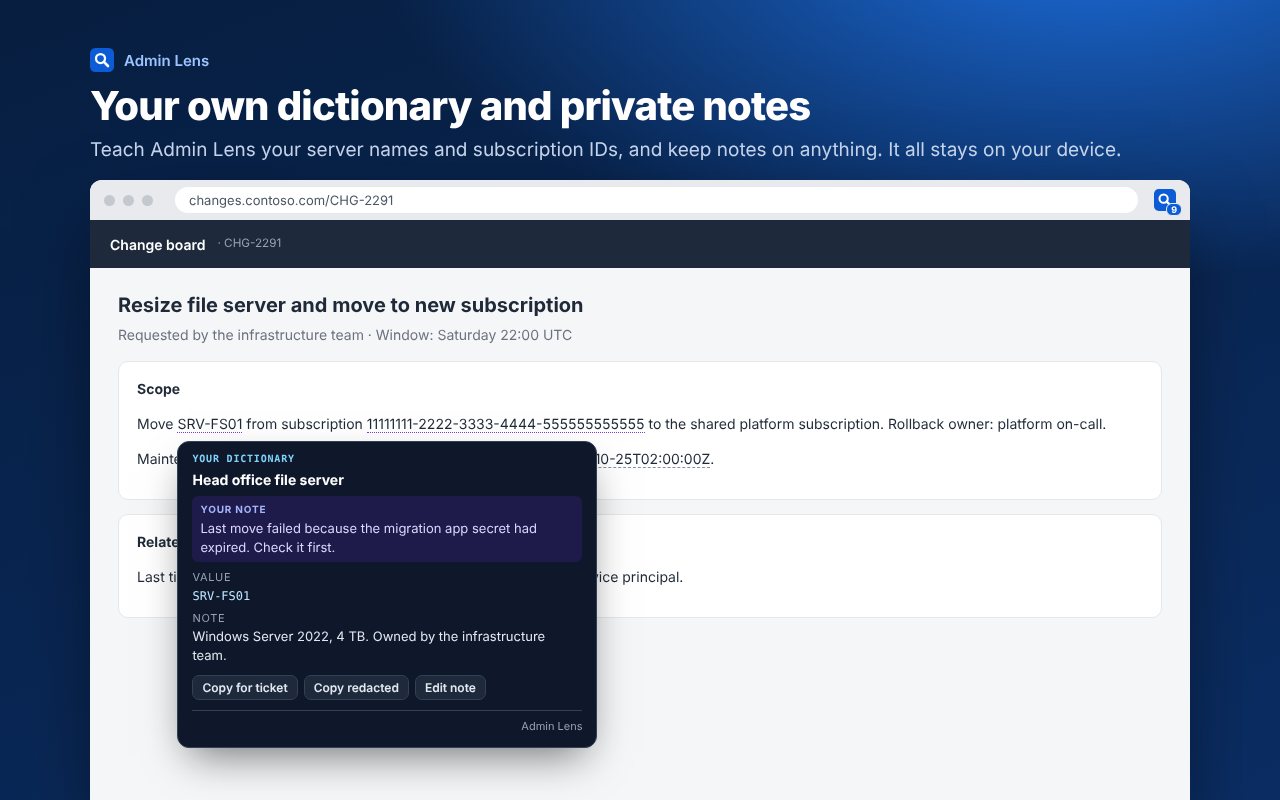
Smarter tickets, earlier warnings
- Copy redacted swaps user names, email and IP addresses, tenant IDs and tokens for placeholders, for vendor tickets and forum posts.
- Check commands on many cards give you the PowerShell, Azure CLI or KQL to confirm what you're seeing.
- Expiry warnings mark dates within 30 days in portal tables, such as client secrets and certificates.
- Consent warnings name any high-risk Graph permission on a Microsoft consent prompt before you click Accept.
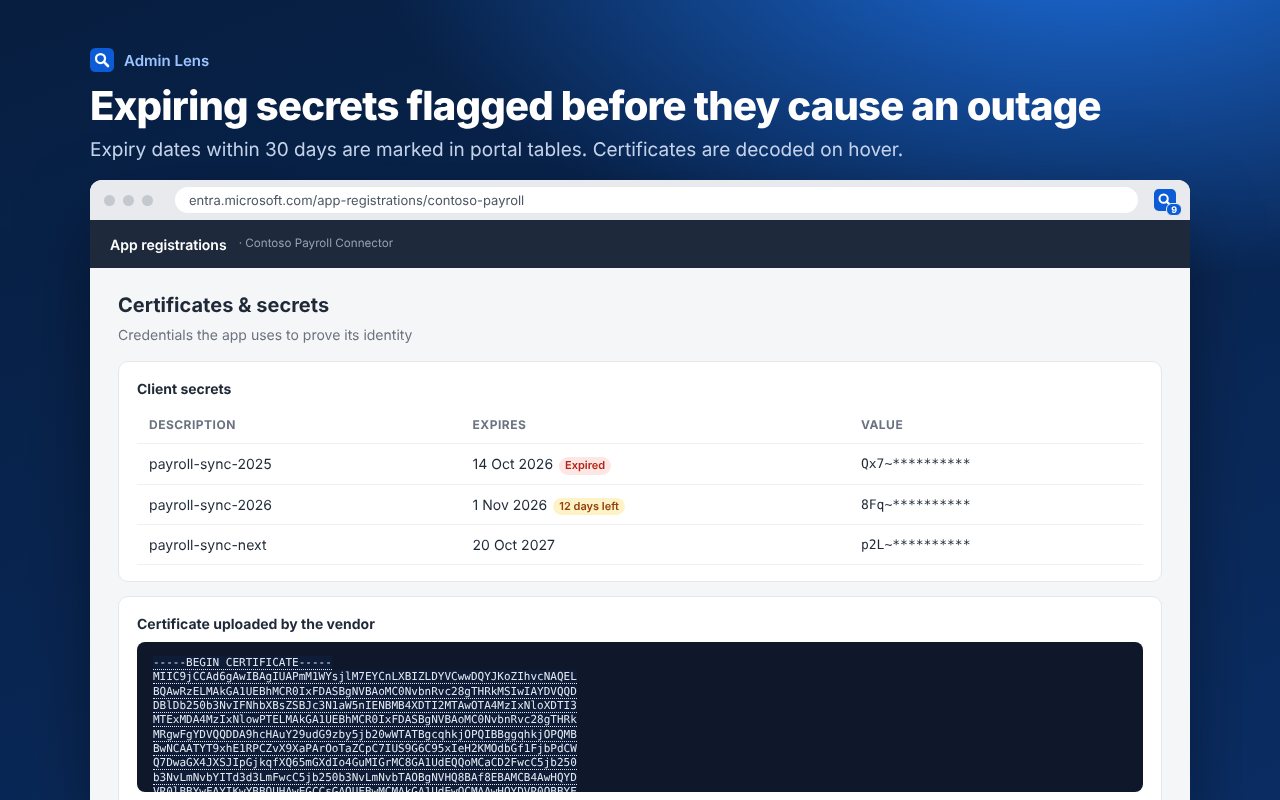
For IT teams
You can now install Admin Lens for everyone, lock its options and share a dictionary of your own names with Intune or Group Policy. Deploying and managing Admin Lens has the settings and a ready-made script.
Still private
Every tool on this site runs in your browser, and nothing you paste is sent anywhere. The cost tool is the one exception that makes a request, and it only asks Microsoft's public price list for the VM sizes and regions you entered. Admin Lens still never sends the pages you look at anywhere. Your dictionary, notes and counts stay in your browser. The privacy policy has the detail.
Admin Lens 2.1 is on its way to Microsoft Edge Add-ons and the Chrome Web Store, and updates itself once each store has approved it. If something it explains looks wrong, or there's a code you'd like it to know, email support@azureblog.co.uk.
Suggest a topic or a tool
Related posts
 Intune Tools NEW
Introducing Admin Lens: errors explained right where you see them
Admin Lens is a free browser extension for Azure, Entra and Intune admins. It explains error codes, Microsoft IDs, tokens and Graph permissions on the page you're already looking at, and copies a clean summary into your ticket. Now live on Microsoft Edge Add-ons and the Chrome Web Store.
 Azure What's new · Automation NEW
Azure Functions in-process support ends on 10 November: find your apps and move them to the isolated worker model
Support for the in-process model for .NET function apps ends on 10 November 2026, the same day .NET 8 reaches end of servicing. Find every affected app across your subscriptions, get an action list for your setup, and move to the isolated worker model with a staging slot and no downtime.
 Azure Security · Governance NEW
Azure Arc for servers: the complete setup guide, and why it changes how you run everything outside Azure
One agent turns any Windows or Linux server, in your datacentre, a branch office or another cloud, into an Azure resource you can patch, protect, monitor and govern from one place. How it works, how to plan it, every onboarding method, what to switch on, day-two operations and troubleshooting, plus a planner that builds your firewall list and onboarding script.